ElevenLabs for Podcasters: How to Add AI Voiceover
The biggest time sink in podcasting isn’t research or editing — it’s re-recording bad takes. ElevenLabs fixes that: edit the script, regenerate the line, done. Whether you want to create a no-mic show from scratch or just stop re-recording entire segments because of one flubbed word, this guide covers how to use ElevenLabs for podcasters — the right plan, the right voice settings, and what to do before you publish. Based on the current interface and verified pricing as of June 2026.
Quick answer:
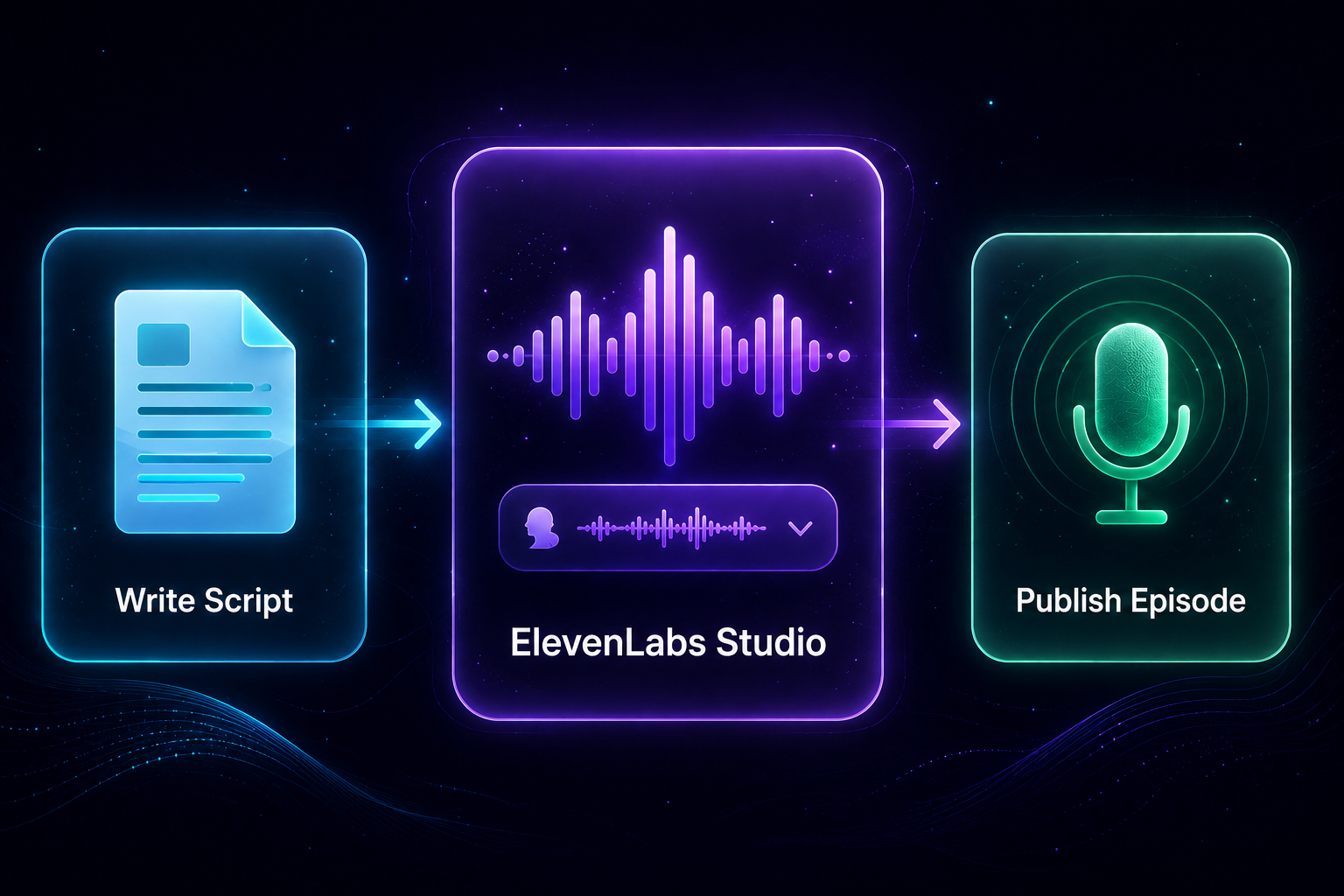
Sign up free → pick or clone a voice → paste your script into ElevenLabs Studio → generate → export. The free plan lets you test the workflow, but you need at minimum Starter ($5/mo) to publish anything commercially. Creator ($22/mo) is where voice cloning kicks in.
What ElevenLabs Can (and Can’t) Do for Podcasters
ElevenLabs is a text-to-speech and voice cloning platform. For podcasters, the core pitch is simple: you type, it talks. The output quality on Eleven v3 — the flagship model released in February 2026 — is genuinely good for long-form narration. Natural pacing, no robotic cadence on most voices, and it handles punctuation-based pauses well.
Where it works well for podcasters:
- Solo narration podcasts — documentary, educational, or essay-style shows where you don’t need a live host voice.
- Fixing pickups without re-recording — regenerate one sentence instead of re-recording an entire segment.
- Multi-voice storytelling — true crime, audio drama, or simulated interview formats using separate voices for each speaker.
- Multilingual expansion — Dubbing Studio (29 languages) lets you re-release existing episodes for international audiences.
Where it’s the wrong tool:
- Live or call-in podcasting — ElevenLabs is text-input only, no real-time audio generation.
- Shows where authentic voice is the whole brand — if your personality is what listeners are subscribing to, a cloned voice (PVC) takes 30+ minutes of training audio and $22/mo minimum.
- Unscripted content — rambling conversations don’t generate well. You need a written script.
3 Podcast Use Cases ElevenLabs Is Actually Built For
Solo Narration — No Mic Required
The clearest use case for ElevenLabs for podcasters: script a show and let it voice every episode. Educational podcasts, daily briefings, news roundups, book summaries — any format that runs from a document. You skip the recording setup, the acoustic treatment, and the bad-take problem entirely. The workflow is 100% script-driven, which suits research-heavy shows.
Voice Clone for Pickups and Fixes
This is what most working podcasters will actually use ElevenLabs for. You recorded an episode, it’s mostly clean, but one sentence is garbled or you misspoke a fact. Instead of re-recording the whole segment, you clone your voice (Instant Voice Clone on Starter plan, Professional Voice Clone on Creator), type the corrected line, generate it, and splice it in post. The fix takes minutes, not another studio session.
Instant Voice Clone (IVC) is available from the Starter plan ($5/mo) and works from about 1 minute of clean audio. If you want the output indistinguishable from your original recordings, Professional Voice Clone (PVC) on Creator ($22/mo) uses 30+ minutes of training audio and takes 3–6 hours to train.
Multi-Voice Storytelling and Audio Drama
ElevenLabs Studio (formerly Projects) lets you assign different voices to different speakers within a single document. You tag lines by speaker, Studio assigns the right voice, and the output comes back as separate tracks or a single mixed file. True crime reconstructions, interview simulations, and audio fiction formats all work well here. The auto-assign feature (currently Alpha) reads your script and tries to map speakers automatically.
Which Plan Do Podcasters Actually Need?
| Plan | Price | Credits | Podcast use |
|---|---|---|---|
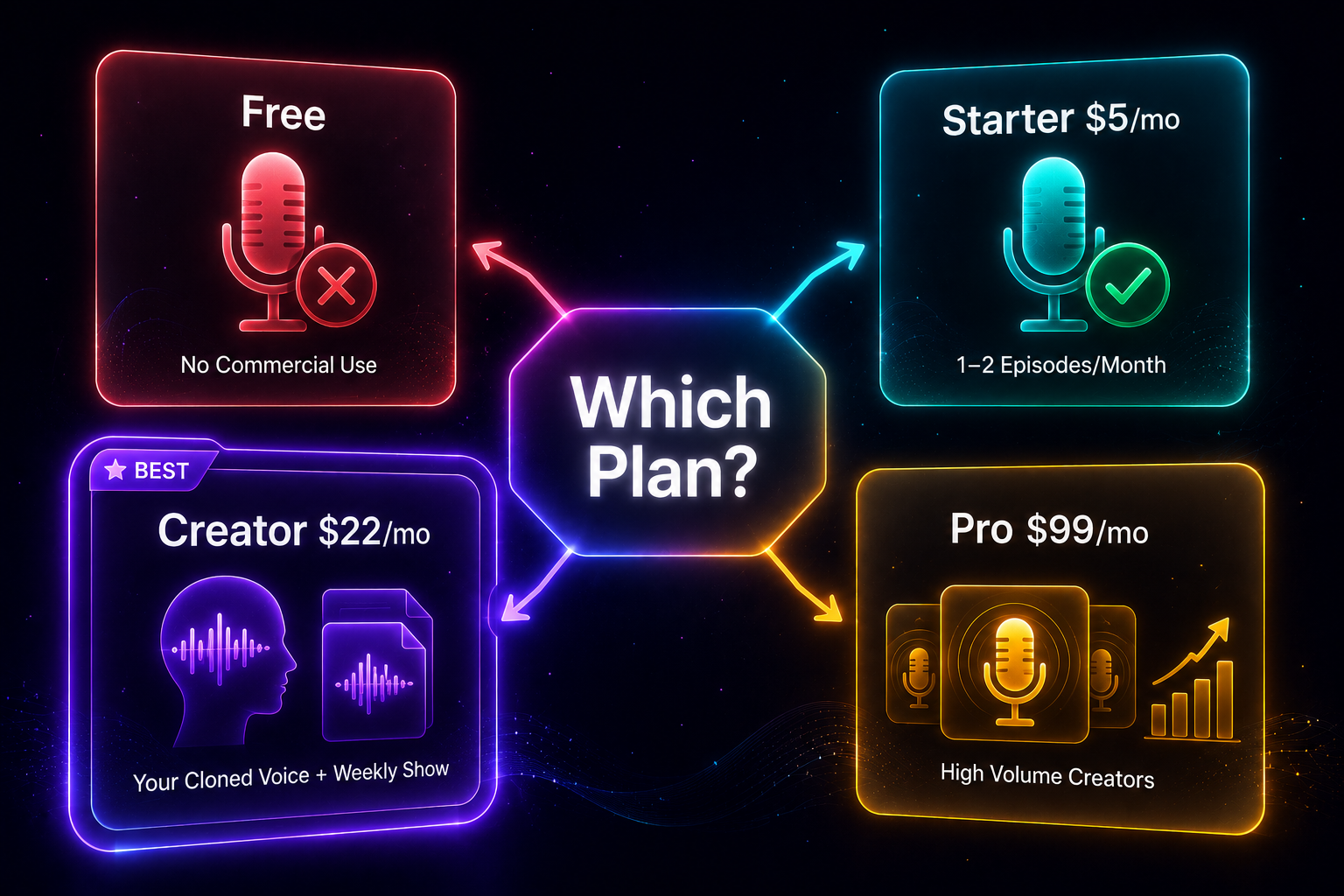
| Free | $0 | 10K chars/mo | Testing only — no commercial license, IVC not included |
| Starter | $5/mo | 30K chars/mo | Commercial OK, IVC included — ~1–2 short episodes/mo |
| Creator | $22/mo | 121K credits/mo | PVC + multiple full episodes/mo — sweet spot for regular shows |
| Pro | $99/mo | 600K credits/mo | Volume — multiple shows, agency use, or heavy Dubbing Studio |
Prices verified June 2026 — confirm at elevenlabs.io/pricing before subscribing. 1 credit ≈ 1 character on most voices.
For a complete breakdown of what each plan includes, see: ElevenLabs Pricing 2026: Which Plan Is Worth It? →
Step-by-Step: Your First Episode in ElevenLabs Studio
ElevenLabs Studio is the long-form audio editor built for exactly this kind of project. Here’s how to go from a blank page to a finished episode — ElevenLabs for podcasters makes this faster than any traditional recording workflow:
- Create your account — go to elevenlabs.io and sign up free. No credit card required on the free plan.
- Go to Studio → New Project — give it a name (your episode title works fine).
- Choose your voice — browse the Voice Library or use a cloned voice if you’re on Starter or above. For narration, voices in the “Narration” or “Audiobook” category hold up best over long scripts.
- Paste your script — Studio accepts plain text. If you have multiple speakers, tag each line:
[Host] Your text here.and[Guest] Their response.Studio can also auto-assign (Alpha) if you prefer. - Generate — you can generate the full project or section by section. Section by section is better for long episodes: easier to regen one bad line without touching the rest.
- Export — download as MP3 or WAV. If you want separate speaker tracks, use the per-track export option before mixing down.
Voice Settings for Long-Form Listening
ElevenLabs gives you three main sliders that matter for podcast audio. The defaults are not optimized for long narration — here’s what to change:
- Stability (35–45%) — controls how consistent the voice is between runs. Below 35% and you get too much unpredictable variation; above 50% and it starts sounding monotone. For a one-hour podcast, you want consistency without losing naturalness — 40% is a good center.
- Similarity (70–75%) — how closely the output matches your source voice sample. Higher similarity means less creative interpretation from the model, which is what you want for a consistent narrator voice across episodes.
- Style (10–30%) — expressiveness and pacing variation. For long-form listening, keep this low (15–20%). High style values add emphasis and dramatic pauses that sound fine for a 30-second ad read but get fatiguing over 45 minutes of narration.
Two-Voice Podcast: Multi-Speaker Setup in Studio
If your format uses more than one speaker — interview simulation, co-hosted segments, or audio drama — Studio handles it natively. Here’s the setup:
- In your script, prefix each speaker’s lines with their name in brackets:
[Alex] I started podcasting in 2022...and[Jordan] What was the hardest part at first? - In Studio, open the Speakers panel and assign a voice to each speaker tag. Alex gets Voice A, Jordan gets Voice B.
- If you’re using the auto-assign (Alpha) feature, Studio will read the tags and map them automatically — useful if you have more than two speakers and don’t want to do it manually.
- Generate per-speaker or all at once. Export as individual tracks if you want to add per-speaker compression in post, or as a mixed file if you’re going straight to upload.
Keep voices clearly differentiated — different pitch ranges work better than different accents. Listeners distinguish voices faster by range than by accent, which matters when they’re not looking at a screen.
Post-Production Before You Publish
ElevenLabs exports clean audio, but podcast platforms have a loudness standard: -16 LUFS integrated (Spotify for Podcasters spec). ElevenLabs audio comes out somewhere between -18 and -23 LUFS depending on the voice — you need to normalize before uploading.
Two ways to do it:
- Descript — one-click loudness normalization built in. It also handles chapter markers, transcript editing, and noise reduction, so it doubles as your editing tool if you’re mixing ElevenLabs audio with recorded segments.
- Audacity (free) — Effect → Loudness Normalization → set target to -16 LUFS. Takes under a minute per file. No frills, but it works.
For intro and outro music, ElevenLabs launched Eleven Music in August 2025 — an AI music generator built into the platform. It’s usable on the free plan. Generate a 15–30 second instrumental, download it, drop it into your edit. Not the most sophisticated music generator available, but it’s zero additional cost if you’re already in the ElevenLabs ecosystem.
For distribution, Spotify for Creators (formerly Spotify for Podcasters) is the easiest free option — it distributes to Apple Podcasts and other major directories. No upfront cost, revenue share model for monetization.
How to Make Money Podcasting with ElevenLabs
ElevenLabs reduces the time cost of producing episodes, which directly increases how much you can publish. More episodes at the same quality level means more ad inventory, more listener touchpoints, and more Patreon value. Here are four concrete income paths:
Sponsored Episodes at Scale
Most podcast sponsors want 3–5 ad reads per episode: pre-roll, mid-roll, post-roll. With ElevenLabs handling narration, your production time per episode drops enough that you can run two shows instead of one, or double your episode cadence on an existing show. More inventory means higher sponsor revenue without proportionally more time.
Premium Patreon Episodes
Patreon tiers reward volume — bonus episodes, extended cuts, behind-the-scenes commentary. When scripted episodes take 30–45 minutes to produce (script + generate + normalize + upload) instead of a full recording day, you can realistically deliver on a higher-tier content calendar. A $10/month tier with 8 bonus episodes/month is viable where it wasn’t before.
Podcast Production Services on Fiverr or Upwork
Other podcasters need intros, outros, promotional trailers, and AI-narrated episode summaries. On Fiverr, narrated podcast intros (30–60 seconds) run $15–$50 each. If you can produce 3–4 per day using ElevenLabs, that’s a realistic $1,500–$2,000/month side income using a Creator plan ($22/mo). The tooling cost is marginal against the revenue.
Multilingual Podcast Expansion with Dubbing Studio
ElevenLabs Dubbing Studio (29 languages, available on Starter and above) lets you re-release existing episodes in Spanish, Portuguese, German, French, and more with AI dubbing that tries to preserve the original voice’s tone and timing. Spanish-language podcasting is one of the fastest-growing markets. Re-releasing your back catalog into Spanish could double your listener base without producing a single new episode.
ElevenLabs — free tier available
10,000 characters/month free. Test the voice and Studio workflow before committing.
ElevenLabs for Podcasters: Which Plan Should You Start With?
Here’s the honest version:
✗ Look elsewhere if: Your show is unscripted or conversational — the text-to-speech pipeline doesn’t fit that format. Also skip it if your “authentic voice” is the brand, and you’re not willing to invest in PVC training.
If you’re starting from scratch, test the free plan for a day. Generate a few minutes of your script with two or three different voices. If the quality meets your standard, upgrade to Starter before your first episode goes live. If you’re planning to clone your own voice from the start, go straight to Creator — the Instant Voice Clone on Starter is fine for pickups, but Professional Voice Clone on Creator is what you’d actually want as a permanent narrator voice.
FAQ
Can I monetize my podcast with the ElevenLabs free plan?
No. The free plan does not include a commercial license. If your podcast earns any revenue — sponsorships, Patreon, ad revenue — you need at minimum the Starter plan at $5/month before you publish your first episode.
How many podcast episodes can I produce per month on each plan?
On Starter (30K characters/month), you get roughly 20–25 minutes of narration — enough for 1–2 short episodes or a handful of segment pickups. On Creator (121K credits/month), you can produce several full 30–45 minute episodes per month. On Pro (600K credits), volume is rarely a constraint for individual podcasters.
Can ElevenLabs clone my voice for a podcast?
Yes, but the quality depends on the plan. Instant Voice Clone (IVC) is available on Starter and above — it works from about 1 minute of clean audio and is good enough for pickups and fixes. Professional Voice Clone (PVC), available on Creator ($22/mo) and above, requires 30+ minutes of training audio and 3–6 hours of processing, but the output is much closer to your natural voice across full episodes. See How to Clone Your Voice with ElevenLabs → for the full walkthrough.
How does ElevenLabs audio quality compare to a real microphone recording?
On Eleven v3 with a well-chosen voice, it’s close enough that most listeners can’t tell on earbuds or in a car. The gap is more noticeable in studio monitors or high-end headphones. The bigger tell is usually pacing — AI narration lacks the micro-variations in speed that come naturally to human speakers. Adjusting Style to 15–20% and Stability to 40% helps narrow that gap.
Can ElevenLabs translate my podcast to other languages?
Yes. ElevenLabs Dubbing Studio supports 29 languages and attempts to preserve the original speaker’s voice characteristics in the translated output. It’s available on Starter and above. Quality varies by language pair — Spanish, Portuguese, and German tend to be the strongest. For high-stakes multilingual releases, review the output before publishing.
ElevenLabs — start for free
Free tier: 10,000 characters/month. No credit card required. Upgrade to Starter ($5/mo) before your first commercial episode.
Free Newsletter
Stay ahead on AI voice tools — no spam, ever.
Read next